Publishing useful content is only half the job. If an important WordPress page has no meaningful internal links pointing to it, visitors may struggle to discover it and search engines may have fewer paths to find and understand it. These isolated URLs are commonly called orphan pages.
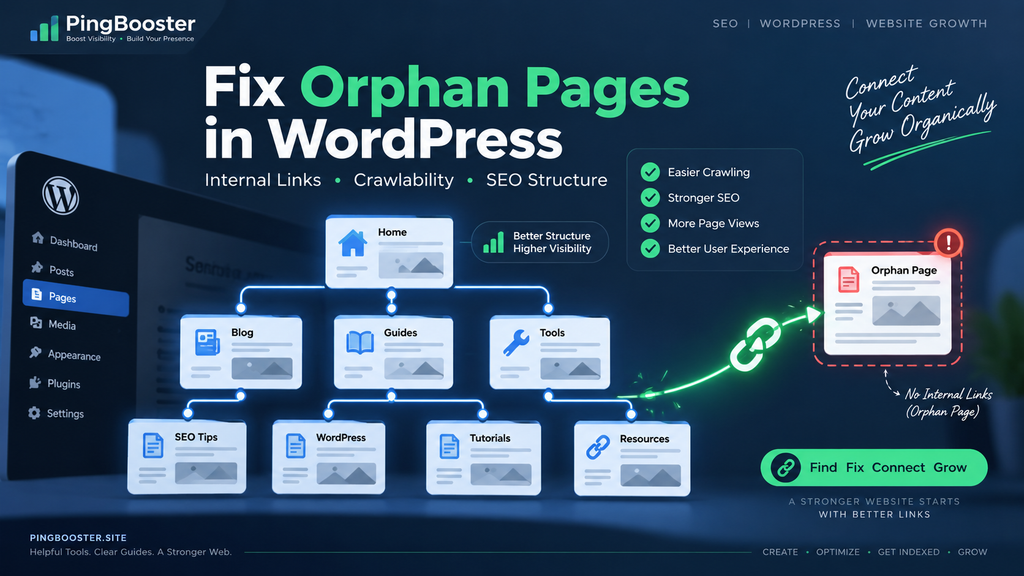
Orphan pages can appear after site migrations, category changes, redesigns, deleted menus, bulk imports, old campaigns, or simply because a new article was published without being linked from older content. The good news is that most orphan-page problems are fixable without rebuilding your website.
In this guide, you will learn how to find orphan pages in WordPress, decide which ones deserve attention, repair internal linking, and build a healthier content structure for both readers and search engines.
What Are Orphan Pages in WordPress?
An orphan page is a page or post that has little or no discoverable internal linking from the rest of your website. It may still exist in your sitemap, appear in Google Search Console, or be accessible through its direct URL, but it is disconnected from the normal navigation and content paths of the site.
Imagine a useful room in a large building with no hallway leading to it. The room exists, but most people will never know it is there. Orphan content creates a similar problem.
Not every page with few internal links is automatically a problem. Some utility pages, campaign landing pages, account pages, legal documents, or intentionally hidden resources may not need strong internal linking. The important question is whether the URL is something you actually want users and search engines to discover.
Why Orphan Pages Matter for SEO
Google uses links to discover pages and understand relationships between content. A logical internal linking structure can help search engines find important URLs while also making a website easier for people to navigate.
1. Discovery can become harder
If no normal page links to an important article, search engines have fewer paths through which to discover it. A sitemap can help expose URLs, but a sitemap is not a replacement for a useful site structure.
2. Context becomes weaker
Internal links provide context. When an article about WordPress indexing links naturally to another article about crawlability, both users and search engines gain a clearer picture of how those resources relate to each other.
3. Users may never reach valuable content
SEO is not only about crawlers. A strong article that cannot be reached from category pages, related posts, guides, menus, or contextual links is also difficult for real readers to find.
4. Your content architecture becomes fragmented
A growing WordPress site can slowly turn into dozens or hundreds of disconnected islands. Repairing these connections creates clearer topic clusters and makes future maintenance easier.
How Orphan Pages Happen in WordPress
Orphan pages are rarely created intentionally. They usually appear as a side effect of normal website growth.
- New posts are published without links from older articles.
- Menus or category structures are changed.
- Old blog posts are removed from navigation.
- Products or pages are imported in bulk.
- A website migration breaks internal links.
- Category or tag archives are deleted or noindexed.
- Old campaign landing pages remain live after a promotion ends.
- URLs are changed without reviewing the surrounding site structure.
- Related-post widgets are removed during a redesign.
For large WordPress sites, this can happen quietly. A site may look perfectly normal from the homepage while dozens of useful URLs sit several layers away from the pages visitors actually use.
How to Find Orphan Pages in WordPress
Method 1: Compare crawl data with your sitemap
One of the most useful approaches is to compare the URLs found through a normal site crawl with the URLs included in your XML sitemap.
If a URL appears in the sitemap but cannot be reached by following internal links during a crawl, it deserves investigation. It may be orphaned, weakly linked, blocked, redirected, or otherwise disconnected from the normal site structure.
Method 2: Review Google Search Console
Search Console can help you identify indexed or discovered URLs that receive little traffic or appear unexpectedly. It should not be treated as a dedicated orphan-page detector, but it is useful when combined with crawl data and your WordPress content list.
Look for important pages that exist in Google but are difficult to reach from your own website. Then check where those URLs are linked internally.
Method 3: Review your WordPress content library
Open your Posts and Pages screens and inspect older published content. Pay special attention to articles created during previous campaigns, imports, plugin launches, or site redesigns.
For every important page, ask a simple question: Which other useful page on my site sends readers here? If the answer is none, you may have found an orphan or near-orphan page.
Method 4: Use an internal link auditing tool
SEO crawlers and WordPress internal-link auditing tools can make the process faster. They can identify URLs with zero incoming internal links, pages buried too deeply in the site, broken links, and content with unusually weak internal-link coverage.
Do not blindly add links just because a tool displays a warning. Relevance matters more than decorating every page with arbitrary links.
How to Fix Orphan Pages Properly
Step 1: Decide whether the page deserves to exist
Before adding links, evaluate the page itself. Is the content still useful? Is it accurate? Does it serve a clear search or user intent? Does another page already cover the same topic better?
If the page has no real value, strengthening its internal links may only preserve weak content. In some cases, updating, consolidating, redirecting, or removing the URL is a better decision.
Step 2: Find the most relevant linking pages
Search your existing content for closely related topics. A page about WordPress indexing might naturally link to an article about XML sitemaps, internal links, crawlability, or indexing troubleshooting.
The link should make sense to the reader at the exact point where it appears. Contextual links usually provide more value than dropping unrelated URLs into a footer or giant list.
Step 3: Use descriptive anchor text
Anchor text should describe what the reader will find after clicking. Instead of repeating generic phrases such as “click here,” use concise wording related to the destination.
For example, an article could link to a related resource using wording such as WordPress indexing checklist or internal linking audit when that accurately describes the destination.
Step 4: Add the page to an appropriate hub
Important content should often be reachable from a category page, resource hub, plugin page, documentation area, or related-post section. A hub-and-spoke structure can prevent new content from becoming isolated later.
Step 5: Confirm the link is crawlable
Use standard HTML links with a valid destination. Search engines are designed to discover normal anchor links, while unusual JavaScript-only navigation can create unnecessary complexity.
Step 6: Keep the sitemap updated
Your XML sitemap should accurately represent the URLs you want search engines to discover. However, repeatedly submitting an unchanged sitemap is not a shortcut to instant indexing. Use the sitemap as part of a broader crawlable site structure.
Build a Better Internal Linking Strategy
The best orphan-page fix is prevention. Every time you publish a new WordPress article, connect it to the rest of your site deliberately.
- Link to at least one genuinely useful older resource from the new article.
- Update one or more older relevant articles so they link back to the new page.
- Place the article in the correct category or content hub.
- Use descriptive internal anchor text.
- Check that important images include useful alternative text where appropriate.
- Confirm the post is indexable and not accidentally blocked by robots settings.
- Check that the canonical URL points where you expect.
- Keep your XML sitemap accurate.
This creates a two-way content network instead of a one-way publishing pipeline.
PingBooster Tip
When publishing a new plugin announcement, SEO guide, or update on PingBooster, do not stop after pressing Publish. Add at least one contextual link from an older related article and connect the new post to an appropriate hub or category. This simple habit can prevent a growing blog from turning into a collection of disconnected pages.
Common Orphan Page Mistakes to Avoid
Adding dozens of irrelevant internal links
More links are not automatically better. Links should help readers move naturally between related resources.
Using the same exact anchor text everywhere
Write anchors naturally. The goal is clarity, not mechanical repetition of a keyword.
Keeping outdated orphan content alive
Some orphan pages are isolated because they are old, redundant, or no longer useful. Review quality before investing effort in them.
Assuming sitemap inclusion solves everything
A sitemap helps search engines discover URLs, but strong internal navigation still matters. Important pages should normally have useful links from other relevant pages.
Creating links that users cannot easily understand
Internal linking should improve the reading experience. A link should clearly communicate what comes next instead of functioning as invisible SEO plumbing.
WordPress Orphan Page Checklist
- The page serves a clear purpose.
- The content is current and useful.
- At least one relevant page links to it.
- Important pages receive contextual internal links.
- Anchor text accurately describes the destination.
- The URL is accessible without login when it is intended for search.
- The page is not accidentally marked noindex.
- Robots rules do not unintentionally block crawling.
- The canonical URL is correct.
- The page appears in the appropriate XML sitemap.
- It belongs to a logical category, hub, or navigation path.
- Broken internal links have been repaired.
- Related older articles have been reviewed for linking opportunities.
How This Helps a Growing WordPress Site
Fixing orphan pages is not a magic ranking switch. It is part of maintaining a site that is easier to crawl, easier to navigate, and easier to understand.
For small websites, reviewing internal links manually may be enough. For larger WordPress installations, recurring audits become more useful because new content, plugin pages, product archives, redirects, and category changes can continuously alter the site structure.
The objective is simple: important content should not be stranded.
Frequently Asked Questions
What is an orphan page in WordPress?
An orphan page is a URL that has no useful incoming internal links, or is so disconnected from the normal site structure that users and crawlers have difficulty reaching it through navigation and content links.
Can Google index an orphan page?
It can. A search engine may discover the URL through a sitemap, an external link, historical crawl data, or another source. However, being discovered does not mean the page has an ideal internal structure or that indexing and ranking are guaranteed.
Does an XML sitemap fix orphan pages?
No. A sitemap can help with URL discovery, but it does not create useful navigation or contextual relationships between your pages.
How many internal links should a page have?
There is no universal number that every page must reach. Focus on useful, relevant connections. Important content should be reachable from other meaningful pages rather than linked simply to satisfy a numerical target.
Should I delete every orphan page?
No. First determine whether the page still provides value. Useful pages can be updated and reintegrated into the site. Redundant or obsolete pages may be better consolidated, redirected, noindexed where appropriate, or removed.
Final Thoughts
Orphan pages are usually a site-structure problem, not a mysterious Google penalty. As your WordPress site grows, review how your important pages connect to one another, keep links crawlable, use descriptive anchor text, maintain an accurate sitemap, and regularly revisit older content.
A healthy website should feel less like a drawer full of separate documents and more like a well-organized library: useful pages connected by clear paths, sensible categories, and relevant references.