We are pleased to announce the release of Share Bee Pro 2.0.4, a compatibility and frontend layout update designed specifically to improve performance on WordPress 7.1 and modern WordPress themes.
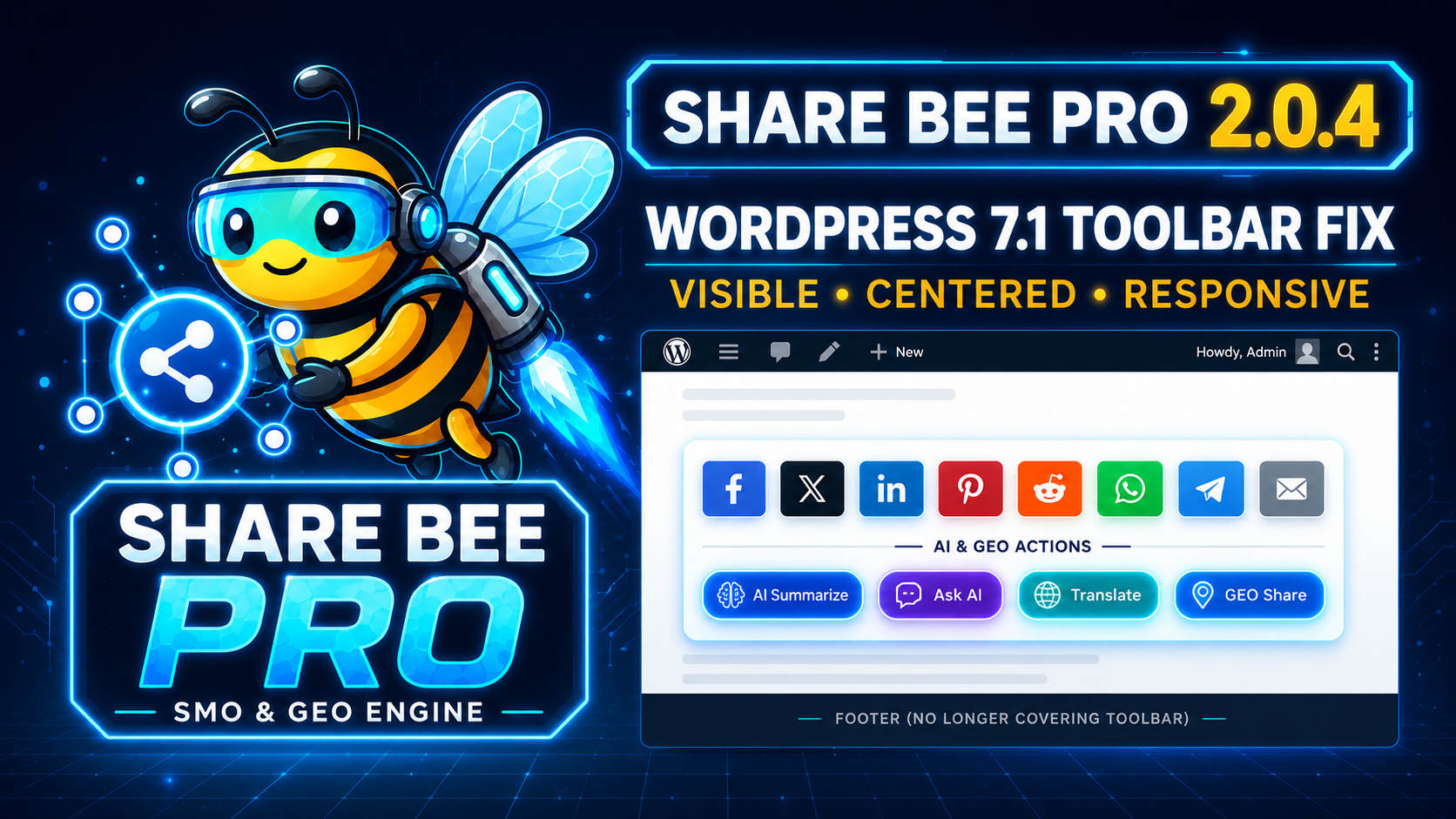
This update resolves an issue where the AI and GEO sharing toolbar could become hidden behind a fixed website footer. It also improves the alignment of both the social-sharing and AI-engine buttons across posts and pages.
What Was Fixed in Share Bee Pro 2.0.4?
AI and GEO Toolbar Visibility Fix
On websites using a fixed or sticky footer, the Explore via GEO (AI Engines) toolbar could appear too close to the bottom of the page.
In some cases, the footer covered the AI buttons completely. Visitors could see the toolbar heading, but the ChatGPT, Claude, Gemini, Perplexity, Grok, and Microsoft Copilot buttons were not visible.
Share Bee Pro 2.0.4 now reserves sufficient space beneath the toolbar, preventing fixed footers from covering the AI-sharing buttons.
Centered Social-Sharing Toolbar
The social-sharing toolbar now appears in the center of the post or page instead of remaining aligned to the left side.
Supported sharing options may include:
- X (Twitter)
- Telegram
- Threads
- Bluesky
- Copy Link
- Additional enabled social platforms
The buttons remain responsive and automatically wrap onto additional lines when the available screen width is limited.

Centered AI and GEO (Generative Engine Optimization) Toolbar
The AI and GEO sharing section is also centered beneath the social-sharing toolbar.
Visitors can clearly access the enabled AI platforms, including:
- ChatGPT
- Claude
- Google Gemini
- Perplexity
- Grok
- Microsoft Copilot
This creates a more balanced and professional presentation across blog posts, pages, service pages, and other supported content types.
Improved WordPress 7.1 Theme Compatibility
Some modern WordPress themes apply global styling rules to native HTML buttons. These rules may unintentionally change a plugin button’s size, position, visibility, border, or spacing.
Share Bee Pro 2.0.4 introduces stronger, theme-safe styling for the AI-engine buttons. These compatibility rules help the buttons remain visible, clickable, properly sized, and correctly aligned without changing their sharing functionality.
Improved Mobile Responsiveness
The updated layout also provides additional spacing on mobile devices.
Social and AI buttons remain centered, wrap responsively, and maintain sufficient clearance from mobile navigation bars, sticky footers, and other fixed website elements.
Sharing Functions Remain Unchanged
This update focuses on layout, visibility, and compatibility. The existing Share Bee Pro sharing functions remain available.
Social-sharing links continue to support campaign attribution through UTM parameters, while AI-sharing buttons continue to generate structured GEO prompts for supported AI platforms.
The AI prompts may include:
- Canonical page URL
- Entity type
- Public and legal business names
- Business description
- Founders or important people
- Services and products
- Areas of expertise
- Service locations
- Official business profiles
- Independent review sources
- Awards and certifications
- Schema.org entity information
- Verification and credibility instructions
Instead of requesting only a basic article summary, Share Bee Pro helps visitors ask AI platforms to investigate the business entity, compare public information, review credibility signals, and distinguish verified facts from unconfirmed claims.
Share Bee Pro 2.0.4 Changelog
- Fixed the AI and GEO toolbar being hidden behind fixed theme footers.
- Centered the social-sharing toolbar on posts and pages.
- Centered the AI and GEO engine toolbar.
- Added additional bottom clearance for short pages.
- Improved compatibility with WordPress 7.1 themes.
- Added stronger visibility rules for native AI buttons.
- Improved responsive alignment on mobile devices.
- Preserved all existing social-sharing and GEO prompt functions.
- Updated the plugin version to 2.0.4.
- Updated the compatibility header to WordPress 7.1.
Why This Update Matters
Share buttons are useful only when visitors can clearly see and access them.
The improvements in Share Bee Pro 2.0.4 provide a cleaner and more consistent experience across different themes, screen sizes, footer styles, and WordPress installations.
The centered presentation also helps the social and AI toolbars appear as an intentional part of the content rather than an unrelated element attached to one side of the page.
Updating to Share Bee Pro 2.0.4
Existing Share Bee Pro users can update to version 2.0.4 using the available plugin package or their supported update method.
After updating, clear your WordPress cache, optimization cache, CDN cache, and browser cache if the previous toolbar styling is still visible.
Once the updated stylesheet loads, the social and AI toolbars should appear centered with sufficient clearance above the website footer.
About Share Bee Pro
Share Bee Pro — SMO & GEO Engine combines social sharing, AI-engine discovery, campaign attribution, entity data, structured schema, and Generative Engine Optimization tools within WordPress.
It helps website owners make their content easier to share across social platforms while providing AI users with structured instructions for researching the website, its business entity, services, reviews, public profiles, and credibility signals.
Share Bee Pro 2.0.4 is now ready with improved WordPress 7.1 compatibility and a cleaner, centered frontend sharing experience.